Note
Go to the end to download the full example code.
Load from SimpleITK
Background. Many imaging scripts already hold images as SimpleITK objects. HABIT can wrap those objects directly, keeping their spacing, origin and direction, so no files have to be rearranged.
Purpose. You get a Cohort built from
SimpleITK images, plus a quick one-step habitat map on one patient to
show the cohort is usable.
When to use. Use this when your code already calls
sitk.ReadImage or produces SimpleITK images; if your files follow the
HABIT folder layout, Load from directory
is shorter.
Key terms.
cohort / subject / ROI – see Load from directory.
one-step habitats – habitats clustered inside one subject only; see Defining habitats inside each subject.
Read an image file and a mask file with SimpleITK, then put the volumes on
a Subject. modality= is the series or ROI
name. One person and several people are each a
Cohort.
One person. Change the two paths to your files.
from pathlib import Path

import matplotlib.pyplot as plt
import SimpleITK as sitk

from habit.contracts import Cohort, ImageVolume, MaskVolume, Subject
from habit.datasets import fetch_demo
from habit.recipes import one_step_habitat
from habit.viz import plot_habitat_overlay, plot_simpleitk_ingest

DATA = fetch_demo()
IMAGE = DATA / "images" / "subj001" / "LAP" / "WATER__WATER__Ax_Dyn_LAVA_Flex+C_Series0009.nrrd"
MASK = DATA / "masks" / "subj001" / "LAP" / "WATER__BH_Ax_LAVA_Flex_10min_Series0017_mask.nrrd"
# from_sitk keeps spacing / origin / direction, so voxel sizes stay physical.
volume = ImageVolume.from_sitk(sitk.ReadImage(str(IMAGE)), modality="LAP")
roi = MaskVolume.from_sitk(sitk.ReadImage(str(MASK)), modality="LAP")
# Dictionary keys are the names later stages use (modalities=..., roi=...).
subject = Subject(
    subject_id="subj001",
    images={"LAP": volume},
    masks={"LAP": roi},
)
one = Cohort([subject], name="one")
print(one)
HABIT demo data (cached)
DATA (preprocessed root): C:\Users\dongm\.habit_data\demo-data-v1\preprocessed

On-disk inventory of this folder:
  subjects (5): subj001, subj002, subj003, subj004, subj005
  image series: LAP, PVP, delay_3min, pre_contrast
  mask keys:    LAP, PVP, delay_3min, pre_contrast
  example image: images/subj001/delay_3min/WATER__BH_Ax_LAVA_Flex_3min_Series0012.nrrd
  example mask:  masks/subj001/delay_3min/WATER__BH_Ax_LAVA_Flex_10min_Series0017_mask.nrrd

Your own data must use the same folder tree (change IDs / series names):

  DATA/
    images/<subject_id>/<modality>/<one image file>
    masks/<subject_id>/<roi>/<one mask file>

Then load it with the same call the demos use:

  cohort = cohort_from_directory(DATA, modalities=("LAP",), roi="LAP")

Swap DATA / modalities / roi to match your tree. Mask key is often the
same as one image series (here LAP).
Cohort(1 subjects [subj001], name='one')
One-step habitats on this one person, then overlay. This only proves the cohort works end to end; habitat stages are explained in section 2.
sitk_result = one_step_habitat(
    modalities=("LAP",), n_habitats=3, random_seed=0, roi="LAP"
).fit_predict(one)
Path("out").mkdir(exist_ok=True)

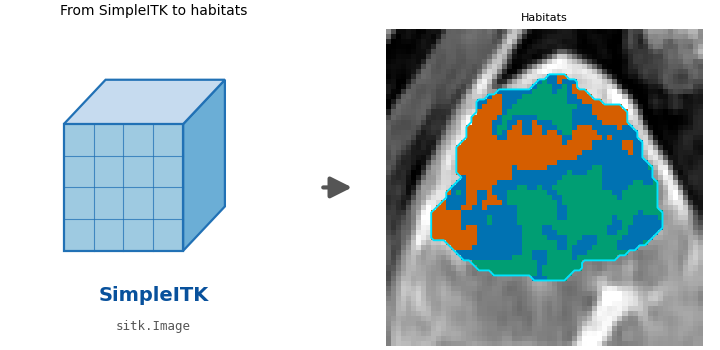
# Visual summary of this route: SimpleITK image objects in, habitats out
# (right panel zooms to the habitat bounding box).
fig_ingest = plot_simpleitk_ingest(volume, sitk_result.habitat_maps[0])
fig_ingest.savefig("out/data_from_sitk_ingest.png", dpi=150, bbox_inches="tight")
plt.show()

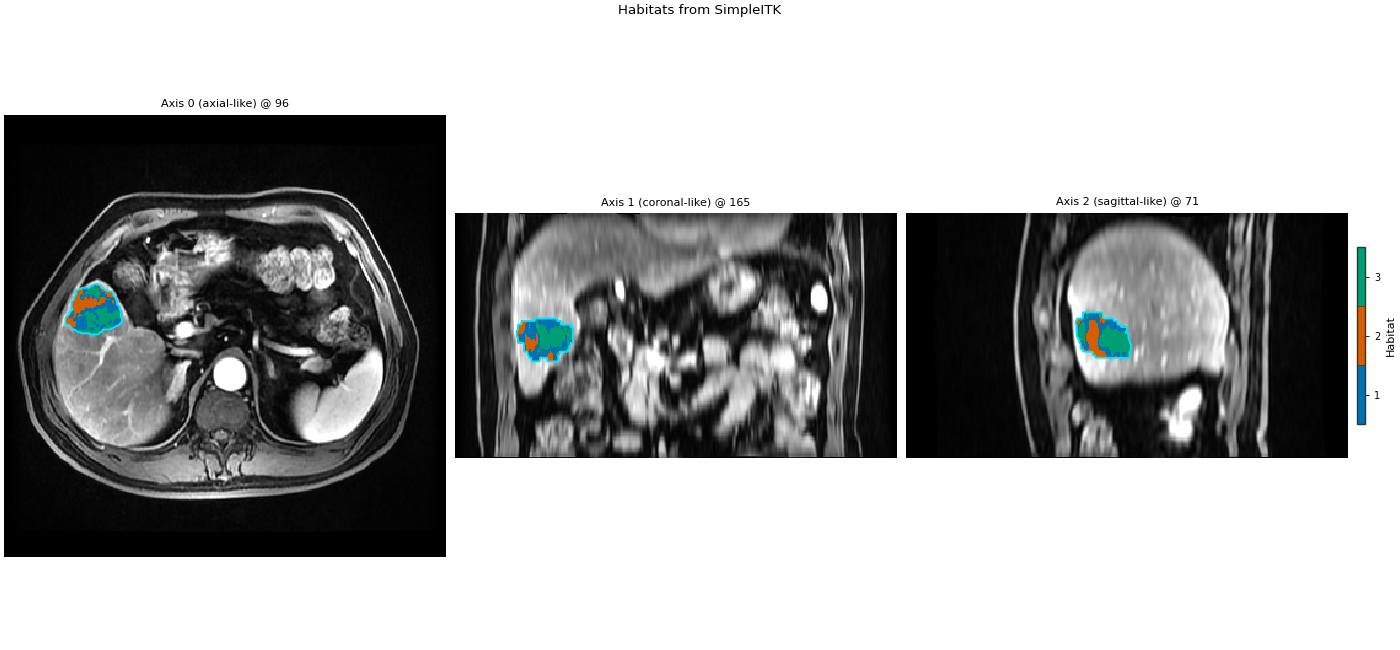
fig_sitk = plot_habitat_overlay(
    volume,
    sitk_result.habitat_maps[0],
    title="Habitats from SimpleITK",
)
fig_sitk.savefig("out/data_from_sitk_overlay.png", dpi=150, bbox_inches="tight")
plt.show()
Cohort.map[_DefineAndLabelWithinSubject]:   0%|          | 0/1 [00:00<?, ?it/s]
Cohort.map[_DefineAndLabelWithinSubject]: 100%|██████████| 1/1 [00:00<00:00,  1.35it/s]
Cohort.map[_DefineAndLabelWithinSubject]: 100%|██████████| 1/1 [00:00<00:00,  1.35it/s]
F:\work\habit_project\habit\viz\diagrams.py:245: UserWarning: Display geometry conflict: image/anatomy direction does not match mask/label direction. Using the mask/label direction so coronal/sagittal superior-up follows the labelled anatomy. Pass direction= to override.
  resolved_direction, resolved_spacing = resolve_display_geometry(
F:\work\habit_project\habit\viz\habitat_overlay.py:806: UserWarning: Display geometry conflict: image/anatomy direction does not match mask/label direction. Using the mask/label direction so coronal/sagittal superior-up follows the labelled anatomy. Pass direction= to override.
  resolved_direction, resolved_spacing = resolve_display_geometry(
Several people. Same construction, one Subject per person.
IMAGE_2 = DATA / "images" / "subj002" / "LAP" / "012_WATERWATERAxDynLAVAFlexC.nrrd"
MASK_2 = DATA / "masks" / "subj002" / "LAP" / "016_WATERWATERBHAxLAVAFlex5min_mask.nrrd"
volume_2 = ImageVolume.from_sitk(sitk.ReadImage(str(IMAGE_2)), modality="LAP")
roi_2 = MaskVolume.from_sitk(sitk.ReadImage(str(MASK_2)), modality="LAP")
subject_2 = Subject(
    subject_id="subj002",
    images={"LAP": volume_2},
    masks={"LAP": roi_2},
)
many = Cohort([subject, subject_2], name="many")
print(many)
Cohort(2 subjects [subj001, subj002], name='many')
Total running time of the script: (0 minutes 3.021 seconds)