Note
Go to the end to download the full example code.
Load from NumPy arrays
Background. Deep-learning and custom pipelines often hold images as
NumPy arrays (or tensors converted to NumPy). An array has no voxel size or
position, so HABIT pairs it with a Geometry that
records spacing, origin and direction.
Purpose. You get a Cohort built from arrays,
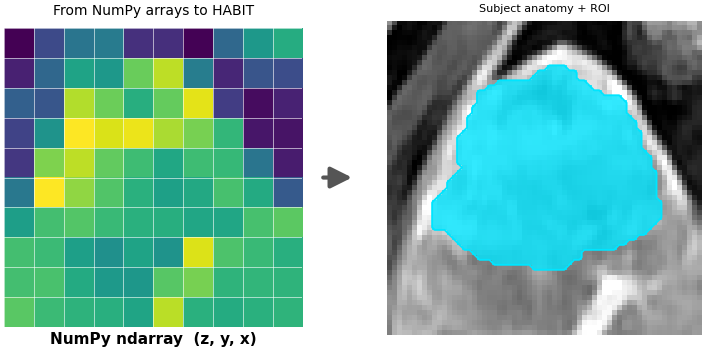
the first rows of its raw voxel-feature table, and a figure showing the
array become a plottable subject.
When to use. Use this when your data is already in memory as arrays; skip it if you have files in the HABIT folder layout (Load from directory).
Key terms.
cohort / subject / ROI – see Load from directory.
geometry – spacing, origin and direction that place an array in physical space; here the image and its mask share one geometry.
voxel feature – the numbers that describe one voxel (here, its LAP intensity); one column per feature.
Arrays use axis order (z, y, x). The mask is integer labels,
0 = background. One person and several people are each a
Cohort.
One person. Change the two paths to your files, then keep the arrays.
from pathlib import Path

import matplotlib.pyplot as plt
import numpy as np
import SimpleITK as sitk

from habit.contracts import ArrayImageRef, Cohort, Geometry, Subject
from habit.datasets import fetch_demo
from habit.viz import plot_numpy_ingest
from habit.voxel_features import RawVoxelFeatures

DATA = fetch_demo()
IMAGE = DATA / "images" / "subj001" / "LAP" / "WATER__WATER__Ax_Dyn_LAVA_Flex+C_Series0009.nrrd"
MASK = DATA / "masks" / "subj001" / "LAP" / "WATER__BH_Ax_LAVA_Flex_10min_Series0017_mask.nrrd"
sitk_image = sitk.ReadImage(str(IMAGE))
# GetArrayFromImage already returns (z, y, x); the mask must be integer labels.
array = sitk.GetArrayFromImage(sitk_image)
mask = np.asarray(sitk.GetArrayFromImage(sitk.ReadImage(str(MASK))), dtype=np.int32)
# Arrays carry no physical metadata, so copy spacing / origin / direction here.
geometry = Geometry.from_array(
    array.shape,
    spacing=tuple(sitk_image.GetSpacing()),
    origin=tuple(sitk_image.GetOrigin()),
    direction=tuple(sitk_image.GetDirection()),
)
np_subject = Subject(
    subject_id="subj001",
    images={"LAP": ArrayImageRef(array=array, geometry=geometry)},
    masks={"LAP": ArrayImageRef(array=mask, geometry=geometry)},
)
one = Cohort([np_subject], name="one")
print(one)
# Sanity check: the array-backed subject already feeds a HABIT extractor.
field = RawVoxelFeatures(modalities=["LAP"])(np_subject)
print(field.feature_frame().head())
field.feature_frame().head()
HABIT demo data (cached)
DATA (preprocessed root): C:\Users\dongm\.habit_data\demo-data-v1\preprocessed

On-disk inventory of this folder:
  subjects (5): subj001, subj002, subj003, subj004, subj005
  image series: LAP, PVP, delay_3min, pre_contrast
  mask keys:    LAP, PVP, delay_3min, pre_contrast
  example image: images/subj001/delay_3min/WATER__BH_Ax_LAVA_Flex_3min_Series0012.nrrd
  example mask:  masks/subj001/delay_3min/WATER__BH_Ax_LAVA_Flex_10min_Series0017_mask.nrrd

Your own data must use the same folder tree (change IDs / series names):

  DATA/
    images/<subject_id>/<modality>/<one image file>
    masks/<subject_id>/<roi>/<one mask file>

Then load it with the same call the demos use:

  cohort = cohort_from_directory(DATA, modalities=("LAP",), roi="LAP")

Swap DATA / modalities / roi to match your tree. Mask key is often the
same as one image series (here LAP).
Cohort(1 subjects [subj001], name='one')
      LAP
0  1020.0
1  1018.0
2  1077.0
3  1073.0
4  1033.0
Visual summary of this route: the array itself (left, as a colour matrix) becomes a plottable Subject (right, zoomed to the ROI).
Path("out").mkdir(exist_ok=True)
fig = plot_numpy_ingest(
    np_subject.image("LAP"),
    roi_mask=np_subject.mask("LAP"),
)
fig.savefig("out/numpy_subject_ingest.png", dpi=150, bbox_inches="tight")
plt.show()
Several people. One Subject per person, then one cohort.
IMAGE_2 = DATA / "images" / "subj002" / "LAP" / "012_WATERWATERAxDynLAVAFlexC.nrrd"
MASK_2 = DATA / "masks" / "subj002" / "LAP" / "016_WATERWATERBHAxLAVAFlex5min_mask.nrrd"
sitk_image_2 = sitk.ReadImage(str(IMAGE_2))
array_2 = sitk.GetArrayFromImage(sitk_image_2)
mask_2 = np.asarray(sitk.GetArrayFromImage(sitk.ReadImage(str(MASK_2))), dtype=np.int32)
geometry_2 = Geometry.from_array(
    array_2.shape,
    spacing=tuple(sitk_image_2.GetSpacing()),
    origin=tuple(sitk_image_2.GetOrigin()),
    direction=tuple(sitk_image_2.GetDirection()),
)
subject_2 = Subject(
    subject_id="subj002",
    images={"LAP": ArrayImageRef(array=array_2, geometry=geometry_2)},
    masks={"LAP": ArrayImageRef(array=mask_2, geometry=geometry_2)},
)
many = Cohort([np_subject, subject_2], name="many")
print(many)
Cohort(2 subjects [subj001, subj002], name='many')
Total running time of the script: (0 minutes 1.396 seconds)