Note
Go to the end to download the full example code.
Partitioning a ROI into supervoxels
Background. A tumour has tens of thousands of voxels. The two-step design first groups them, inside each subject, into small patches of similar voxels, so the cohort model later clusters a few rows per subject instead of every voxel.
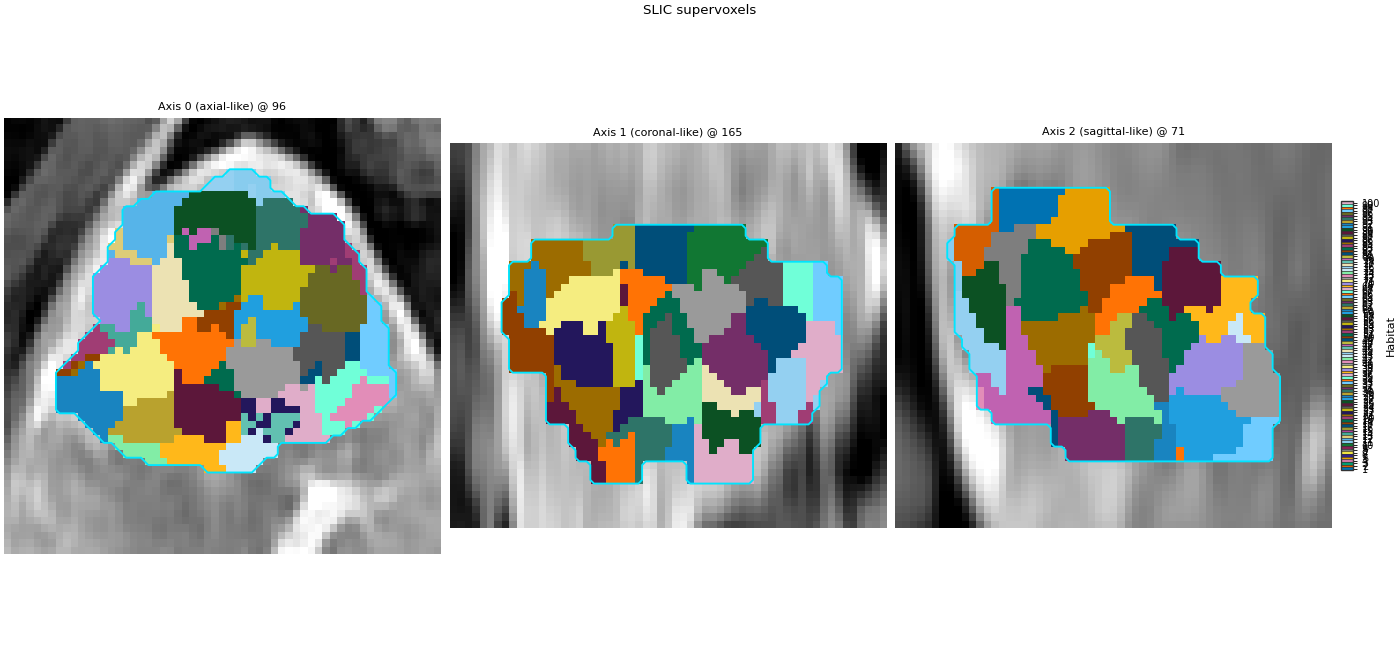
Purpose. You get about 100 supervoxels for one subject, a table with one mean feature vector per supervoxel, and an overlay showing the patches on the arterial image.
Key terms.
supervoxel – a small patch of neighbouring voxels with similar features, clustered inside one subject first (
partition), so the cohort model clusters tens of rows per subject instead of every voxel, which is faster and less noisy.partition stage – the stage that builds supervoxels;
slicandkmeansare two registered partitioners.SLIC (simple linear iterative clustering) – grows supervoxels from a regular grid of seeds;
compactnesstrades feature similarity against spatial closeness (higher gives rounder, more regular patches).
Input: a VoxelFeatureField. Output: a
Supervoxelization. Stage: partition with
slic.
Load one subject
Change DATA / MODALITIES / ROI to your preprocessed layout.
sphinx_gallery_thumbnail_number = 1
from pathlib import Path

import matplotlib.pyplot as plt

from habit.contracts import cohort_from_directory
from habit.datasets import fetch_demo
from habit.supervoxel import SlicSupervoxelizer
from habit.viz import plot_habitat_overlay
from habit.voxel_features import RawVoxelFeatures

DATA = fetch_demo()
# Three DCE phases: unenhanced, arterial, and portal-venous.
MODALITIES = ("pre_contrast", "LAP", "PVP")
ROI = "LAP"
subject = cohort_from_directory(DATA, modalities=MODALITIES, roi=ROI)[0]
print(subject.subject_id)
HABIT demo data (cached)
DATA (preprocessed root): C:\Users\dongm\.habit_data\demo-data-v1\preprocessed

On-disk inventory of this folder:
  subjects (5): subj001, subj002, subj003, subj004, subj005
  image series: LAP, PVP, delay_3min, pre_contrast
  mask keys:    LAP, PVP, delay_3min, pre_contrast
  example image: images/subj001/delay_3min/WATER__BH_Ax_LAVA_Flex_3min_Series0012.nrrd
  example mask:  masks/subj001/delay_3min/WATER__BH_Ax_LAVA_Flex_10min_Series0017_mask.nrrd

Your own data must use the same folder tree (change IDs / series names):

  DATA/
    images/<subject_id>/<modality>/<one image file>
    masks/<subject_id>/<roi>/<one mask file>

Then load it with the same call the demos use:

  cohort = cohort_from_directory(DATA, modalities=("LAP",), roi="LAP")

Swap DATA / modalities / roi to match your tree. Mask key is often the
same as one image series (here LAP).
subj001
Read intensities, then partition
SLIC groups nearby voxels with similar intensity. Each row of
units.features is the mean vector of one supervoxel.
field = RawVoxelFeatures(modalities=list(MODALITIES), roi=ROI)(subject)
print(f"{field.values.shape[0]} voxels, columns: {list(field.feature_names)}")
# n_supervoxels is a target, not an exact count (SLIC may return a few
# more or fewer patches); compactness=10.0 is the default value.
units = SlicSupervoxelizer(n_supervoxels=100, compactness=10.0)(field)
print(f"n_supervoxels={len(units.features)}")
print(units.features.head())
34694 voxels, columns: ['pre_contrast', 'LAP', 'PVP']
n_supervoxels=100
            pre_contrast          LAP         PVP
supervoxel
1             380.128767   787.739726  760.224658
2             433.455657  1026.703364  922.183486
3             397.488024   857.470060  840.371257
4             442.124242  1151.854545  889.772727
5             377.165929   942.422566  781.544248
Supervoxel overlay
fig = plot_habitat_overlay(
    subject.image(ROI),
    units,
    title="SLIC supervoxels",
    crop_to="labels",
)
Path("out").mkdir(exist_ok=True)
fig.savefig("out/slic_supervoxels.png", dpi=150, bbox_inches="tight")
plt.show()
F:\work\habit_project\habit\viz\habitat_overlay.py:806: UserWarning: Display geometry conflict: image/anatomy direction does not match mask/label direction. Using the mask/label direction so coronal/sagittal superior-up follows the labelled anatomy. Pass direction= to override.
  resolved_direction, resolved_spacing = resolve_display_geometry(
Total running time of the script: (0 minutes 25.276 seconds)