plot_nifti_ingest
Note
This page is a reference documentation. It only explains the function signature, and not how to use it. Please refer to the Habitat Guide and Python API guide (v2.0) for usage.
- plot_nifti_ingest(image: object, roi_mask: object, *, title: str = 'From NIfTI files to Subject', panel_title: str = 'Subject anatomy + ROI', crop_pad: int = 8) Figure[source]
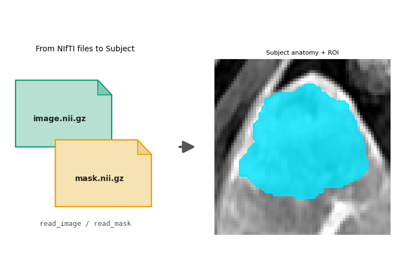
Diagram for the file-pair route:
image.nii.gz+mask.nii.gz.The right-hand panel is the cropped anatomy with a cyan ROI fill, the same view as
plot_directory_ingest()/plot_numpy_ingest(). This page does not fit habitats; the story is files toSubject.- Parameters:
image – Anatomy volume (array or
ImageVolume) of one subject.roi_mask – ROI mask (array or
MaskVolume), same grid asimage.title – Figure title (ASCII-sanitised).
panel_title – Title of the cropped data panel.
crop_pad – Context voxels around the ROI bounding box (default
8).
- Returns:
A matplotlib
Figurewith the NIfTI file-pair badge on the left and the cropped anatomy + cyan ROI fill on the right.